༺Aurendale Engines༻
─────────────────── ✦ ───────────────────
The Wanderer Engine
Light, In-Game Roll System

The Frontier Engine
Full Foundry Virtual Tabletop SystemCOMING SOON
༺The Wanderer Engine༻
The Wanderer Engine is a straightforward rule set using the DiceMaster add-on. Character creation consists of selecting 5 Traits and assigning modifier bonuses among 5 Skills. The philosophy behind the engine is to have something easy to jump into and interactive without having to do a bunch of math. A lot of flavor is left to the roleplay, so there are no classes or roles, just the selections you make during character creation.
☙Philosophy of Play❧
In Aurendale, low rolls don’t represent sudden incompetence. Combat is a back-and-forth of pressure, positioning, blocks, parries, and near-misses. A failed roll might mean being forced on the defensive, losing footing, or being momentarily outplayed, not that a character is suddenly incapable.We encourage players to treat success and failure as shared storytelling beats. Taking the backseat when the moment shifts is part of the fun, and reacting can be just as compelling as acting.
☙Order of Operations❧
While not strictly enforced, this suggested order of operations helps keep turns clear, smooth, and fun.1. Declaration (OOC)If there are multiple enemies or targets, make a brief OOC declaration stating who you’re targeting and your intended action (attack, heal, ability, etc.).2. Rolls (OOC)Roll all relevant dice, including any reaction or defense rolls from the intended target.3. Emote (IC)Once results are known, write your roleplay post. The attacker emotes first, followed by the defender’s response. Knowing the outcome ahead of time allows roleplay to naturally reflect success, failure, or partial results.
☙Hit Points❧
All characters have 5 Hit Points. When a character reaches 0 HP, they are considered "downed." They are out of combat unless an effect brings them back. This can be roleplayed out however you wish depending on the scene. They could be unconscious, or they could just be too injured to keep fighting.
☙Advantage & Disadvantage❧
Instead of roll modifiers, combat makes use of advantage & disadvantage. Advantage means that you roll twice and take the higher result. Disadvantage means that you roll twice and take the lower result. Your rolls will gain these statuses from various Traits, from both your allies and your foes.Sometimes you may gain one or the other from multiple sources. If this is the case, it only counts as one instance so there isn't a "stacking" effect. This is because advantange and disadvantage can cancel each other out. For instance, if you were about to roll with advantage, but an effect made you roll with disadvantage, then you would simply roll once since the two cancel each other out.
☙Inspiration❧
Characters begin battles with 3 Inspiration. Inspiration lets you re-roll any roll you just made. You can use any amount of inspiration that you want at any time, so all 3 could be used on the same roll. This is easily tracked with a custom resource in DiceMaster, so once you use a point of inspiration you just need to click it.Re-rolls are not affected by advantage/disadvantage. Each point of inspiration will always re-roll one dice result.
☙Rolling in Combat❧
Battles begin with a default /roll (100) to determine initiative. This turn order will remain static throughout the encounter, so you can easily keep track of when your turn is coming up.Most rolls during combat involve an attack roll versus a defense roll. There are no modifiers tied to these rolls, so they are strictly roll vs. roll. So while there is a turn order, everyone will need to be on their toes, because if you are attacked you'll need to roll for defense. Critical rolls occur when the roll result is 20. Critical failures occur when the roll result is 1. When you are rolling attack and you roll critical, you get to follow up with another attack roll. If you roll critical while defending, you get to counterattack against your attacker. There are a few scenarios in these rolls, so please see the below table to see the break down.> (Greater Than)
< (Less Than)
| ATK Roll | DEF Roll | Result |
|---|---|---|
| 20 | <20 | Defender loses 1 HP. Attacker rolls attack again. |
| 20 | 20 | Defender takes no damage. |
| <20 | 20 | Defender makes an attack roll against attacker. |
| >DEF | <ATK | Defender loses 1 HP. |
| =DEF | =ATK | Defender takes no damage. |
| <DEF | >ATK | Defender takes no damage. |
| 1 | 1 | Defender takes no damage. |
| 1 | >1 | Defender makes an attack roll against attacker. |
| >1 | 1 | Defender loses 1 HP. Attacker rolls attack again. |
In simple terms, if the attack roll is higher than the defense roll, 1 HP is lost. If the Attacker rolls critical, or the Defender rolls a critical failure, another attack happens immediately. If the Defender rolls critical, or the Attacker rolls a critical failure, then the Defender gets to attack back. If both rolls are critical or critical failures, then they cancel each other out.
☙Traits❧
Traits affect how your character performs in combat. They are split between Active Traits and Passive Traits. Active traits are abilities that you can use on your turn. They have a limited number of uses per battle. Passive traits are effects that are always in play and do not take up any turns. There is no limit to how many active or passive traits you can select for your total of 5. They can be all one or the other, or a mix of the two kinds.
Active Traits
| Active Trait | Description | Uses |
|---|---|---|
| Assault | Your attack roll is made with advantage. The enemy’s defense roll is made with disadvantage. | 2 |
| Attack All | Make one attack roll. Each enemy makes a separate defense roll against it. This attack cannot trigger extra attacks or counterattacks. | 1 |
| Debilitate | Enemy rolls disadvantage on all rolls until your next turn. | 3 |
| Enfeeble | All enemies roll disadvantage on all rolls until your next turn. | 1 |
| Rally | Until your next turn, all allies roll with advantage. | 2 |
| Stealth | Until your next turn, you cannot be targeted by enemy attacks or abilities. | 2 |
| Heal | Restore 1 HP to an ally. | 3 |
| Heal All | Restore 1 HP to all allies. | 1 |
| Revive | Bring back a downed ally with 1 HP. | 1 |
| Taunt | Enemies cannot target any allies except for you until your next turn. | 3 |
Passive Traits
| Passive Trait | Description |
|---|---|
| Attacker | You roll advantage on all attack rolls, but disadvantage on all defense rolls. |
| Frenzy | When you are below half HP (rounded down), your attack rolls have advantage. |
| All In | You roll criticals on 19 or 20. You roll critical failures on 1 or 2. |
| Ambusher | You roll advantage on attack rolls against enemies that did not attack their last turn. |
| Swift | You automatically go first in the initiative order. If there are multiple instances of Swift, roll between those instances. |
| Lucky | You gain an additional point of Inspiration, raising your maximum to 4. |
| Caretaker | You gain two additional uses of Heal, and one additional use of Heal All. You roll disadvantage on all attack rolls. |
| Opportunist | Whenever you perform a counterattack, you roll with advantage. |
| Iron Hide | +2 HP. |
| Defender | You roll advantage on all defense rolls, but disadvantage on all attack rolls. |
☙Skills❧
Skill rolls are typically made outside of battle. These are general attributes of your character, and how they affect and react to the world around them. You get 15 points to distribute among the 5 skills. No skill may go higher than +10, but otherwise you may distribute them however you like.
| Skill | Description |
|---|---|
| Strength | Physical force and raw power. Used for lifting, breaking, pushing, grappling, forcing doors, dragging weight, or overpowering obstacles with muscle. |
| Finesse | Precision and fine control. Used for lockpicking, pickpocketing, sleight-of-hand, tinkering, disarming, delicate crafting, or tasks needing steady, subtle hands. |
| Mind | Logic, knowledge, and reasoning. Used for puzzles, recalling lore, solving riddles, reading patterns, interpreting runes, navigating magic, or making sense of the world. |
| Agility | Speed, reflexes, and balance. Used for dodging hazards, climbing or leaping gaps, acrobatics, reacting to danger, or moving across unstable terrain. |
| Fortitude | Endurance and resilience. Used for resisting poison or illness, pushing through pain, holding breath, surviving harsh environments, or enduring physical strain. |
☙Putting It All Together❧
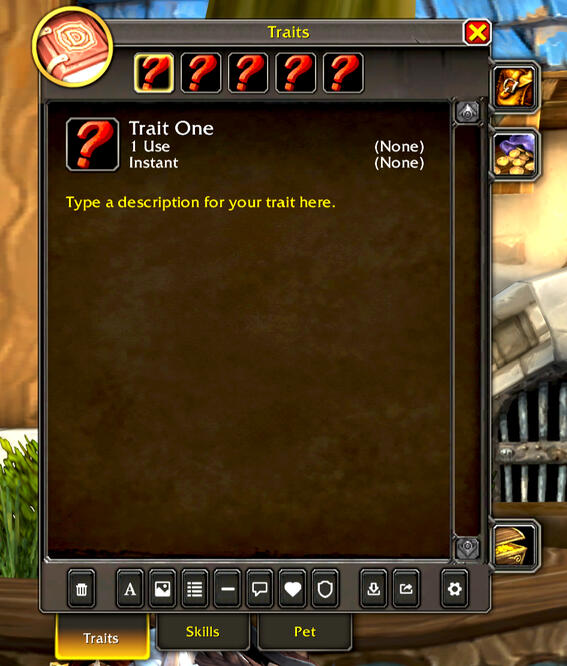
Once you've selected your 5 traits and distributed your skill points, all that's left is putting it into your DiceMaster profile. The add-on naturally has space for traits that you will simply copy/paste in. You can use any pictures you'd like to flavor your character. This is also where you will track your active trait uses. You can just click the "Use" row underneath the trait number to set and track how many uses you have left.
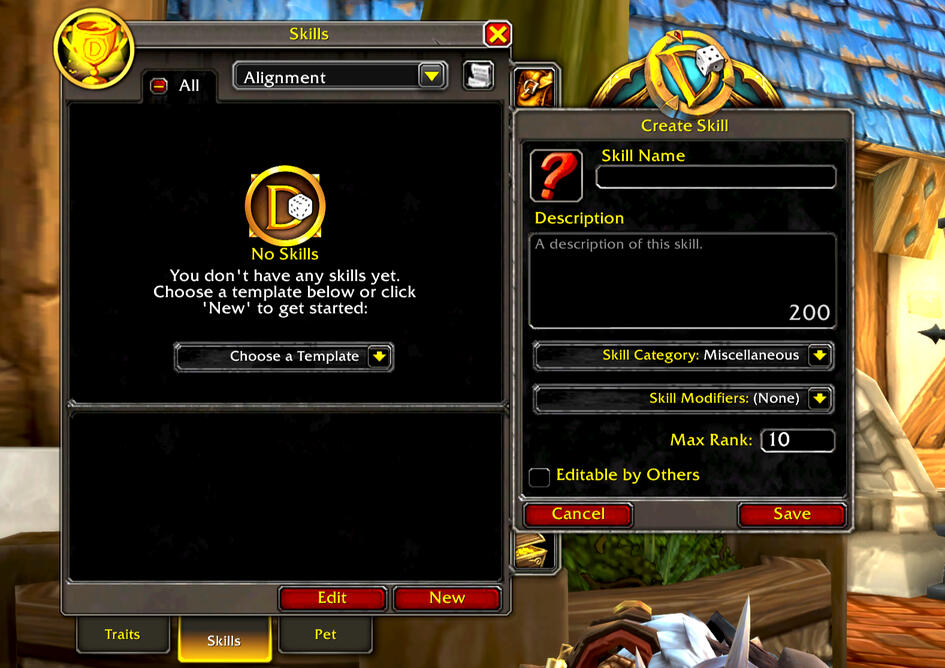
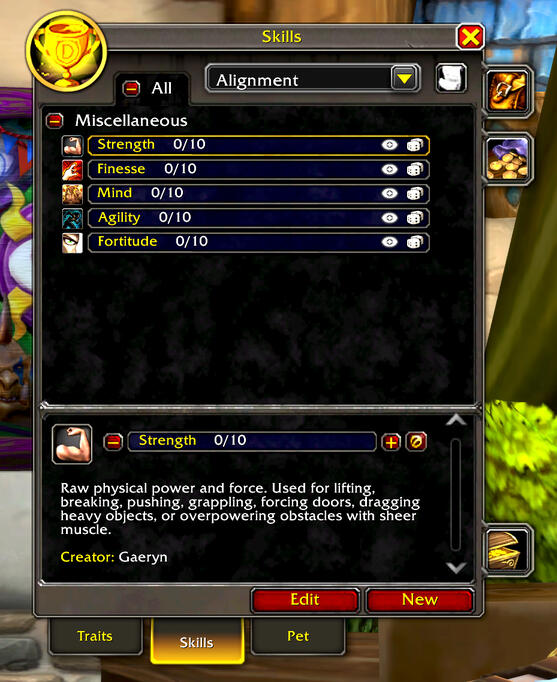
When you're ready to put your skills in, you just go to the "Skills" tab and click "New" to put in our custom skills. You can just copy/paste from this site to put them in.
To set up your resources, go into the add-on settings to the "Health/Resource Bars" menu. Set your Maximum Health to 5 (or 7 if you selected Iron Hide). Change "Resource Type" to (None). Click "Enable Resource Bar" and put in Inspiration. Set the Maximum Resource to 3 (or 4 if you selected Lucky).
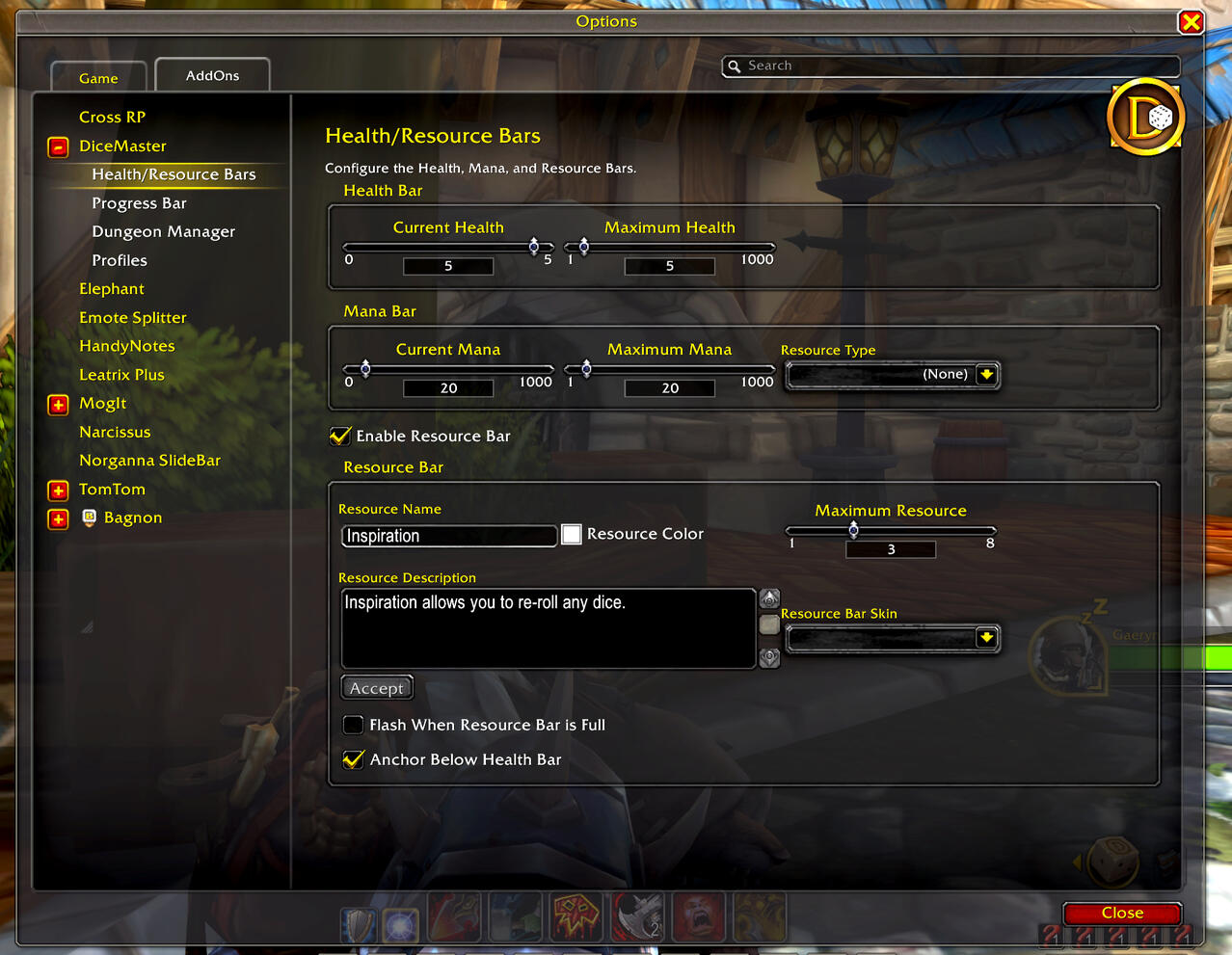
Once you've done all that, you're done! If you have questions about character creation, or getting things set up in DiceMaster, don't hesitate to reach out in the Discord.